
نظام إدارة المستشفى باستخدام Microsoft Access: تقرير التصميم والتنفيذ
- To create a relational database system using Microsoft Access.
- To store and manage hospital records: patients, doctors, and visits.
- To link tables using relationships for consistent data management.
- To develop forms and reports for practical usage and output.
- tblPatients – Stores patient details.
- tblDoctor – Stores doctor information.
- tblVisit – Records each patient’s visit and diagnosis.
- tblPatients.ID → linked to visits (patient)
- tblDoctor.ID → linked to visits (doctor if applicable)
- One-to-many relationships from patients and doctors to visits.
- Patient Details: Used to register new patients and edit information.
- Doctor Details: Used to register doctors with specialties.
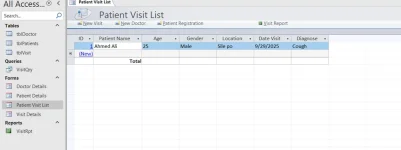
- Patient Visit List: Displays all visits, editable and includes buttons (New Visit, New Doctor, Patient Registration).
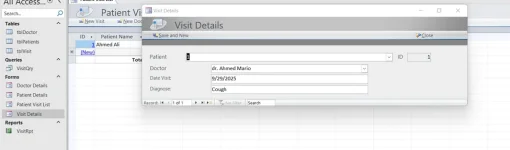
- Visit Details: Form to enter full visit data, includes all patient fields + diagnosis.
- Shelly & Vermaat. Microsoft Access 2019.
- Rob & Coronel. Database Systems: Design, Implementation, and Management.
- Microsoft Documentation – Access User Guide.
- CIS26222 Course Notes.
Table of Contents
Content | Page |
Title Page | 1 |
Table of Contents | 2 |
Introduction | 3 |
Project Objectives | 4 |
Entity and Relationship Design | 5 |
Tables Overview | 6–7 |
Forms Design | 8 |
Report and Queries | 9 |
Conclusion | 10 |
References | 11 |
Appendices (Screenshots) | 12–14 |
Introduction
This project represents a Hospital Management System designed using Microsoft Access. The system is aimed at recording and organizing patient visits, managing doctor details, and generating reports.
It applies core database principles like relational design, data entry forms, queries, and reports to support healthcare data processing.
Project Objectives
Entity and Relationship Design
Entities:
Tables Overview
tblPatients
Field Name | Data Type | Description |
ID | AutoNumber | Primary Key |
Patient Name | Short Text | Full name |
Age | Number | Patient's age |
Gender | Short Text | Male/Female |
Location | Short Text | City or region |
tblDoctor
Field Name | Data Type | Description |
ID | AutoNumber | Primary Key |
Doctor Name | Short Text | Full name |
Specialty | Short Text | Medical specialty |
tblVisit
Field Name | Data Type | Description |
ID | AutoNumber | Primary Key |
Patient Name | Short Text | Patient linked |
Age | Number | At time of visit |
Gender | Short Text | Male/Female |
Location | Short Text | Patient's area |
Date Visit | Date/Time | Visit date |
Diagnose | Short Text | Diagnosis |
Forms Design
Report and Queries
Query:
VisitQry – Returns all visits with patient name, date, and diagnosis. Can be filtered by date.
Report:
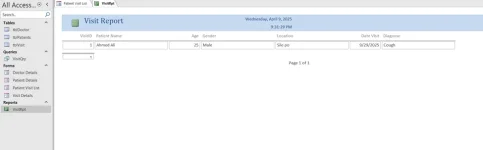
VisitRpt – Printable report showing all patient visit details. Used for archiving or printing.
Conclusion
This hospital management database system successfully uses Microsoft Access to handle essential healthcare data. The project demonstrates how forms, queries, and reports can be combined with relational tables to build a complete application that is easy to manage and use in real-world scenarios.
References
Appendices (Screenshots)
Appendix A: Patient Visit List Form
Appendix B: Patient Details Form
Appendix C: VisitRpt Report (Optional)
التعديل الأخير: