
- Username: Student
- Password: Pa55w.rd
- Portal URL: Azure AI Foundry
- Username:
- Password:
- From the left-hand menu, select Playgrounds
- Click on Language to open the Language playground.
- Created an AI project and hub
- Extracted named entities and key phrases from real-world hotel reviews
- Applied text summarization to long reviews
- Learned how to manage and clean up cloud resources efficiently
Lab Report: Analyze Text in Azure AI Foundry Portal
Student Name:
Lab Module: Module 02 – Analyze text in Azure AI Foundry
Lab Account Username:
Lab Project Name:
Objective
This lab introduces how to use Azure AI Language services via the Azure AI Foundry portal to extract named entities, identify key phrases, and summarize text using Natural Language Processing (NLP) tools.
1. Windows Login
2. Sign in to Azure AI Foundry Portal
 Signed in successfully to the Azure AI Foundry platform.
3. Create Project in Azure AI Foundry
Steps:
Navigate to: Azure AI Foundry
Click Create, then choose Azure AI Foundry resource
Enter:
Project Name:
Subscription: Default provided Azure subscription
Resource Group: ResourceGroup1
Project and hub successfully created. Redirected to Overview page.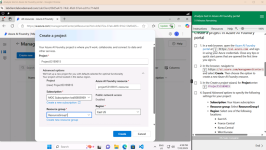
4. Open Language Playground
5. Extract Named Entities
Steps:
In Language Playground, choose:
Extract information → Extract named entities
Paste the text:
In the Azure AI Language playground, the "Extract Named Entities" tool was used to analyze a hotel review describing a negative customer experience. The review described The Royal Hotel in London as an outdated establishment with average room furnishings, poor internet connectivity, and a misleading location description regarding its proximity to the British Museum.
When the named entity recognition feature was run, Azure AI Language accurately identified key entities such as the hotel name, geographic locations (city and country), and nearby landmarks. Each extracted entity was accompanied by a type classification (e.g., organization, location) and a confidence score, reflecting the model’s certainty in the extraction process.
Source:
Microsoft. (2024). Analyze text in Azure AI Foundry portal – Lab Guide. Retrieved from Azure AI Foundry
Click Run
Entities successfully extracted with confidence scores and categories
6. Extract Key Phrases
Steps:
In Language Playground, choose:
Extract information → Extract key phrases
Pasted the review:
In the key phrase extraction task within the Azure AI Language playground, a hotel review was analyzed that described a highly positive guest experience at The Royal Hotel in London. The review highlighted aspects such as clean and well-equipped rooms, courteous staff, and a prime location near major landmarks like Buckingham Palace and Westminster Abbey.
Additional details included a peaceful courtyard and a fine dining experience at a Michelin-starred Indian restaurant affiliated with the hotel group. The reviewer also praised the suite-style rooms, which featured a kitchen, lounge, spacious bedroom, and a large bathroom. The key phrase extraction feature successfully identified and extracted the most relevant terms that encapsulated the overall sentiment and main points of the review.
Source:
Microsoft. (2024). Analyze text in Azure AI Foundry portal – Lab Guide. Retrieved from Azure AI Foundry
Click Run
Key phrases successfully extracted
7. Summarize Text
Steps:
In Language Playground, choose:
Summarize information → Summarize text
Pasted: same text in previous step
Click Run
Text summarized using extractive summarization. Ranked sentences were highlighted.
8. Clean Up Resources
Steps:
Open: Microsoft Azure
Locate ResourceGroup1
Select all created resources.
Click Delete, then confirm with Yes
All resources deleted successfully to prevent unnecessary costs.
Conclusion
In this lab, we successfully explored core NLP features available in Azure AI Language services via Azure AI Foundry. We:
ملف التقرير
علق بالاسفل للحصول ع الملف للتقرير وورد
التعديل الأخير: